
Content Revenue Engine (CRE) turns WordPress into a structured monetization system designed for publishers, premium blogs, research platforms, paid newsletters, niche media and knowledge businesses.
Unlike tools that start from a membership-first model and then try to force content monetization on top of it, CRE starts from the logic of the content itself: articles, premium insights, reports, one-time purchases, subscription access and hybrid monetization models.
This guide explains how CRE works, how its monetization layers interact, how to configure the main components, how to use shortcodes and Elementor-compatible layouts, and how to combine metered access, Pay-Per-Post and subscriptions inside one coherent system.
Table of Contents
- Overview: what CRE does and why it is different
- Monetization architecture: how CRE is structured
- Quick Setup: guided onboarding and initial configuration
- Metered Paywall: free reading limits and reader flow
- Exemptions: what stays free and what should not count
- Pay-Per-Post (PPP): monetizing individual articles, categories and tags
- Pricing logic: deterministic hierarchy and predictable behaviour
- Access+: subscription-based access inside CRE
- Notices and CTAs: reader messaging and conversion points
- Shortcodes: how to use CRE anywhere in WordPress
- Elementor and builder-safe monetization layouts
- PMPro compatibility: combining memberships and content monetization
- Dashboard: monetization visibility and operational insight
- Inspector: understand why a post is accessible, counted or blocked
- Use cases and publishing models
- Frequently asked questions
- Final summary
1. Overview: what CRE does and why it is different
Most WordPress monetization plugins were built around membership systems. Content Revenue Engine was built around content monetization logic.
That difference changes everything.
CRE was designed for publishers who want to monetize articles, premium insights, analysis, research and professional knowledge without having to rebuild their site around a heavy membership-first architecture.
Instead of forcing editorial monetization into a rigid subscription framework, CRE introduces a structured revenue system built around the real publishing questions:
- How many free articles should visitors read?
- Which content should remain open?
- Which articles should be sold individually?
- How should pricing behave when multiple rules overlap?
- What should the reader see before, during and after restriction?
- How should subscriptions interact with premium content?
The result is a cleaner, more predictable and more scalable monetization model inside WordPress.
2. Monetization architecture: how CRE is structured
One of CRE’s biggest strengths is that it separates monetization into clearly defined layers instead of mixing everything into one opaque permission system.
2.1 Metered Paywall
This controls how many posts a visitor can read for free during a defined period.
2.2 Pay-Per-Post (PPP)
This allows selected content to be sold individually, by post, category or tag.
2.3 Access+
This adds subscription-based access inside the CRE runtime, allowing subscriptions to work alongside paywalls and Pay-Per-Post rules.
2.4 Access Logic
This is the decision layer. It determines what counts, what stays free, what price applies, whether access is allowed and which monetization message should be shown.
Because these layers are separated but coordinated, CRE avoids the cascading conflicts often found in traditional paywall and membership plugins.
3. Quick Setup: guided onboarding and initial configuration
CRE includes a Quick Setup flow designed to help publishers launch a usable monetization model without configuring every setting manually from scratch.
3.1 What Quick Setup typically covers
- Free article limit
- Paywall period selection
- Initial notice wording
- Basic CTA configuration
- Basic exemptions
- In Pro, the first premium monetization layer
3.2 Why it matters
Guided setup reduces configuration errors, shortens launch time and makes CRE easier to adopt for editorial teams.
4. Metered Paywall: free reading limits and reader flow
The Metered Paywall is usually the first layer of editorial monetization. Instead of blocking everything immediately, it allows readers to consume a limited number of posts before they are asked to subscribe, upgrade or pay.
4.1 How it works
You define how many eligible posts a visitor can read during a period. For example:
- 5 posts per month
- 3 posts per week
- different limits by role or access level
4.2 Correct counter behaviour
- Only new posts count
- Revisits do not count again
- If the reader has 1 read left, that post should still be accessible
- The next new eligible post should then be blocked
- Exempt content should not consume the counter
- PPP content should not consume the counter
4.3 Why it matters
Many paywall systems frustrate readers by counting the same post twice or by blocking content inconsistently. CRE is designed to avoid that behaviour.
5. Exemptions: what stays free and what should not count
Not all content should be monetized in the same way. CRE includes a flexible exemptions layer so publishers can decide what remains strategically open.
5.1 What can be exempted
- Specific categories
- Specific tags
- Individual posts
- Pages
- Roles or internal users
5.2 Real-world examples
- Keep “News” open while monetizing “Premium Analysis”
- Exclude strategic pages such as Pricing, Contact or My Account
- Keep SEO acquisition content outside the meter
- Allow editors or internal teams to bypass restrictions
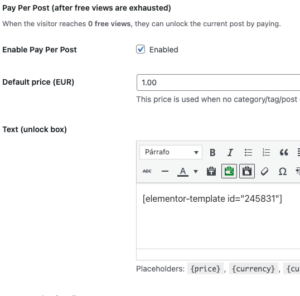
6. Pay-Per-Post (PPP): monetizing individual articles, categories and tags
Pay-Per-Post is one of the strongest parts of CRE Pro. It allows selected content to be monetized directly without relying only on a site-wide subscription model.
6.1 What can be monetized with PPP
- Individual posts
- Whole categories
- Specific tags
- Selected premium content within a mostly open site
6.2 Where PPP works best
- High-value practical articles
- Research reports
- Niche analysis
- Evergreen premium content
- Premium editorial series
6.3 Why PPP matters strategically
PPP expands monetization options dramatically. Publishers are no longer forced into a single all-or-nothing subscription model.
7. Pricing logic: deterministic hierarchy and predictable behaviour
CRE uses a deterministic pricing hierarchy so monetization remains predictable even when multiple paid rules overlap.
Post price → Category price → Tag price → Default price
7.1 Why it matters
Predictable pricing reduces support problems, simplifies administration and makes monetization easier to audit.
8. Access+: subscription-based access inside CRE
Access+ extends CRE Pro with subscription-based access while remaining aligned with the same monetization engine.
Instead of creating a disconnected membership layer, Access+ is designed to work alongside the metered paywall and Pay-Per-Post logic inside one structured system.
8.1 What Access+ adds
- Subscription-based access to protected content
- Plan-based access control
- Upgrade path from CRE Pro
- Integrated gating and monetization messaging
8.2 Why that matters
This allows publishers to combine one-time purchases and recurring access without splitting monetization into conflicting systems.
9. Notices and CTAs: reader messaging and conversion points
CRE does not just block content. It also manages the communication around monetization.
9.1 Notices
Notices can inform the reader about:
- remaining reads
- last free article status
- meter exhaustion
- whether the current content is premium
9.2 CTAs
CTAs can guide the reader to:
- subscribe
- unlock the article
- upgrade access
- visit pricing
- log in if they already have access
9.3 Best practices
- Do not overload the page with multiple messages
- Render one primary CTA per context
- Separate informational notices from sales CTAs
10. Shortcodes: how to use CRE anywhere in WordPress
Shortcodes make CRE more flexible than a purely automatic monetization system.
They allow publishers to place monetization blocks inside posts, pages, widgets, templates, landing pages and builder-driven layouts.
10.1 Typical shortcode uses
- Display a purchase block for a paid article
- Insert a monetization box in a landing page
- Reuse a CTA across multiple locations
- Embed premium article blocks inside Elementor layouts
11. Elementor and builder-safe monetization layouts
CRE is designed to work safely with modern builder-based WordPress sites.
11.1 Why this matters
- Monetization should not break layout integrity
- CTAs should match the visual identity of the site
- Publishers should be able to design branded monetization experiences
11.2 Typical uses
- Custom notice templates
- Premium CTA sections
- Hybrid unlock-or-subscribe blocks
- Reusable premium layouts inside Elementor
12. PMPro compatibility: combining memberships and content monetization
CRE can work alongside PMPro when the role of each system is clearly defined.
The practical model is simple:
- PMPro manages memberships and recurring subscription flows
- CRE manages editorial monetization logic
12.1 Example scenarios
- Free + Premium: visitors get limited reads, members get broader access
- PPP + memberships: readers can subscribe or buy selected premium content individually
- Hybrid publishing: some restrictions bypassed by level, some content remains individually premium
13. Dashboard: monetization visibility and operational insight
The CRE dashboard is designed to provide visibility into how monetization rules behave across the site.
Depending on configuration and edition, it is intended to surface signals such as:
- evaluated views
- allowed reads
- paywall blocks
- premium-content blocks
- notice and CTA visibility
This helps publishers understand monetization as an operational system, not only as a settings panel.
14. Inspector: understand why a post is accessible, counted or blocked
The Inspector adds transparency to the monetization system.
Instead of guessing why a post is open, paid or restricted, administrators can review the rule logic applied to that content.
14.1 What the Inspector helps evaluate
- whether the content counts toward the meter
- whether it is exempt
- whether PPP applies
- which pricing rule is active
- which access logic is being applied
15. Use cases and publishing models
15.1 Premium blog with a hybrid model
Open content for traffic and authority, plus premium PPP insights for direct monetization.
15.2 Professional newsletter with a premium archive
Recent issues remain open while the archive is monetized by article, category or topic.
15.3 Consulting or expert-led publication
General articles stay free, while research, frameworks and specialist guidance become paid assets.
15.4 Specialist media site
News stays open; analysis, reports and premium opinion become monetized content.
15.5 Knowledge business
Editorialized knowledge becomes monetizable intellectual property without forcing the site into a course platform model.
16. Frequently asked questions
16.1 Does CRE replace PMPro?
Not necessarily. One of the strongest setups is PMPro for memberships and CRE for editorial monetization logic.
16.2 Can I monetize only selected posts?
Yes. That is one of the strongest advantages of Pay-Per-Post.
16.3 Can I keep entire categories outside the paywall?
Yes. Exemptions allow you to exclude categories, tags, posts, pages and roles.
16.4 Can I use Elementor-designed CTAs?
Yes. CRE is designed to work with builder-based monetization layouts.
16.5 Do paid posts consume the meter?
The intended and recommended behaviour is that they do not.
16.6 Can I place monetization blocks manually?
Yes. Shortcodes make that possible across many WordPress contexts.
17. Final summary
Content Revenue Engine is not just a content restriction plugin. It is a structured monetization engine for WordPress designed for publishers and content businesses that create value through what they publish.
Its strength lies in combining:
- Metered Paywall
- Pay-Per-Post
- structured access logic
- deterministic pricing
- custom notices and CTAs
- reusable shortcodes
- Elementor-friendly monetization design
- Access+ subscriptions
- dashboard visibility
- inspection tools
All of this works inside WordPress without forcing the site into a heavy, fragmented monetization stack.
Content Revenue Engine
Professional monetization for serious publishers.